



¶ Introduction and MacBook Neo News
Hello and welcome to episode 599 of the Connected Podcast from Relay. This episode is brought to you by Mercury Weather, Squarespace, and Steam Clark. My name is Mike Hurley and I have the pleasure of introducing Prince Flexi Federico Fetici. Hi Federico. Hi. Hello Mike, how are you? I'm good. It's just me and you today. Yes. We will hopefully all be together next week. Hopefully for episode six hundred.
Uh I wanna warn you, uh that currently the the show note document that we have in Notion of episode six hundred, I think the f there are two topics where it just says hold for Steven. So we've got that one to look forward to, I guess. Ominous.
¶ MacBook Neo Self-Service Colors
Uh I got a bit of follow up for you. Um this so we were talk me and Stephen were talking last time about the the fact that the MacBook Neo has the self service repair part. uh available now on their their like portal and I was like, oh could you buy different colours, you know, and swap things around. And Steven said, because as it has been in the past, no, you need to give them your serial number and it just lets you buy replacement parts that are like for like.
But it seems that now I've got a report from The Verge, who are also reporting uh something from that Macwald found, that you can Choose the colors of the parts that you buy irrespective of the model of MacBook Neo that you have. So in theory, you could get a new keyboard, a new top case in different colors and swap them around. And that is especially interesting for anybody who is even just a little bit tinkery, because apparently this computer is so easy to take apart. So
There you go. Okay. You're gonna do it? Are you interested in doing this? I am conceptually interested, but I'm not gonna do it. Oh god. Yeah. Are you using MacBook Neo at all? Hm, not much. I think it's gonna end up being like a like a beta computer. I don't know, we'll see.
Uh but not much because like uh I realized I I open so many apps on a daily basis. Uh I I don't know. And also like I j I gotta use the MacBook Pro for real work, you know, and the MacBook Neo, I think it's a great computer, like if you just wanna write or just browse the web or do l more lightweight things. And it's uh the the form factor of it makes me happy, but uh I think it's gonna end up being my secondary Mac for like betas in the summer, stuff like that.
¶ Myke's Backup Dilemma Continues
that. Okay. All right, Federico, we need to get into talking about my backups again. Okay. So as a very quick refreshment of this We were talking about backups in a pro show a couple of weeks ago. Uh then it was highlighted to me that Backblaze, which is what I've been using for my online backup, is no longer backing up Dropbox files because of reasons that they say.
Um, and then this sent me down like just a spiral of trying to work out how to back up my computer in a way that is desirable for me. So I wanna give you an update to where what the last week has given. So I made the decision after doing a lot of thinking about how I was gonna make this work for me that I didn't want to go for a network attack storage device. I got lots of recommendations for products that did look good.
But ultimately I wanted s I wanted something that was immediately understandable to me, which Mac OS is, and also would then allow me to do some Mac O S Y things on a computer that is always on and always connected to the internet. That idea is interesting to me as it is to many people.
¶ Mac Mini and SSD Backup Plan
So I thought to myself, right, what I'll do, because I don't necessarily need a beefy machine here, I will just get a base Mac Mini and an SSD, and that's where I'll start, right? Get the Mac Mini and then just download my entire Dropbox. to that SSD. It can just live there. Because even in the file provider era that we're in, Dropbox can still
put itself onto an external drive. There are some restrictions around that and some like ways that you have to do it, but Dropbox document it all very well, it seems. So I was like, okay, that's what I'll do. Then I started looking and there were no Mac minis. Just didn't make it. This didn't exist. Thank you, OpenClaw. Yeah. Um now I actually did look today and some are available for pickup now, even if delivery is still like six weeks from now.
Um, but it's only the complete base model and I was wondering if I'd maybe want w want more RAM, but anyway, I couldn't get anything. And so
¶ Storage Research and M1 MacBook Pro
Then I was like, uh, okay, let me go look at network attack storage devices again. Uh and I was kind of going down the rabbit hole of what would make sense here, and I was looking at some products that took NVMe drives. My word, the price of NVMe storage right now is unbelievable. Truly unbelievable. Um like it they're more expensive than external SSDs. Like just like you know, like uh like say like one of those Samsung things or whatever. Like it's just
unhinged the prices of this stuff right now. So I was like, right, that's not gonna work. And I found a crucial seeing the company crucial, they make external SSDs. And I found an eight terabyte SSD drive for I think it was like six hundred pounds, which is expensive, but in the grand scheme of where things are right now
That's okay. And I'm not paying attention to what that would have cost me before because there's no point in doing that. I don't live in that reality. So I was like, well, I still need something to connect it to if I go down that road. Uh and I was like, oh, I have my M1 iMac. Like that is a a computer I have in a box. It's like I can use that. And then I remembered, hang on a minute, I have a MacBook Pro. I have my M one Max MacBook Pro.
J that just sitting in the studio. And that was a computer that when I moved from the MacBook Pro to the MacBook Air, I thought to myself, I'm gonna keep this MacBook Pro because I think someone in my life will need a computer at some point.
'Cause that happens, right? So I was like, this and that machine it's a few years old at that point. I was like, I was looking at the prices, like I can't really make a decent money back. So I'm gonna hold on to this computer. Someone will need it at some point. Turns out that someone ended up being me. 'Cause this machine is beefy. I've got two terabytes of onboard SSD in this thing. I got the max uh CPU because when that computer came out, I definitely only needed a pro.
But we didn't really understand what Max and Pro were like and I ordered it very quickly. Um, it's why I bought a polishing cloth because I I just thought that that was something that I would need and I anyway. Uh so I g I got that and uh It's also got like sixty four gigabytes of RAM in it, I think. And so it's like it's a very powerful machine. It's like, well that's much better for what I might want to do with this thing. And so
Uh I got the SSD, I got the MacBook Pro up and running, I kind of cleared it out of apps I'm not gonna need, because I'm not gonna use it like my regular laptop, right? So let's get rid of Slack, let's get rid of all the regular apps I might have on my computer. Let's clear out a bunch of stuff.
Um and so set that all up and I put the SSD in and I was like, right, I'm gonna deal with this later on. Like I formatted the SSD the way that it needed, um to APFS encrypted, which is what Dropbox wanted, fine.
¶ Backblaze Issues and Data Migration
Then I had to go to a show and a s as I'm recording a show I get a notification from Backblaze telling me that my Backblaze license was inherited by my Mac. Moving the license away from my Mac Mini. I don't know why that decision was made. So that that license was previously inherited from my MacBook Pro to my Mac Mini. I don't know why turning that MacBook Pro on again. would without me doing anything, move that license back to that computer.
And it I couldn't get it to swap back. It was throwing an error. And so I had to Contact their support team to understand I then had to uninstall Backblaze, reinstall Backblaze, and do the whole dance of like the inherent backup, which It had the Backblaze app was showing this screen of like it said inheriting backup downloading. It was showing that one screen for two days without anything changing.
And I so I have I didn't I wasn't in the studio yesterday. I left my Mac mini doing its thing. Uh I came in today and it was still showing that screen. So this is two days after I started. And so I was like, well something's not right here. So I force quit the app. Opened it again and it's like, hey, it's all done. It's like what are we talking about? So this is you know, and I've been
I'll say, like, I, you know, I've been kind of getting into it a little bit with Backblaze's support team, uh, because I asked them to help me do this. They helped me do this, and then I said, by the way, why did you do this with Dropbox?
You know, like why have you why are you no longer up uh backing up Dropbox? They told me why it doesn't work on a Windows PC. I told them I'm using a Mac. They gave me They gave me an answer, which I'm not sure that I fully understand why now, right?'Cause they're talking about the way that like
um file providers work and who knows, maybe something changed on Tahoe. And like, whatever. Maybe it is impossible for them. But as I explained to the support person, and I was being very nice, but I am a I'm a disgruntled customer, right? So I'm not being rude, but I'm explaining why I'm upset. I just said like that. Why did you not contact customers before deleting the data? And they said, Well, your data's still available for thirty days, you can just go download it and it's like
My point still stands. Like after 30 days, that data is completely gone and you didn't do anything to explain to anyone. And this person's like, well, unfortunately I have no control over the communications, to which I'm like, Of course you don't. But I've lodged my complaint. And I'll come back to this in a moment, but I am considering, you know, switching away from Backblaze. So
That is that I've got that machine sorted out now. The Backblaze migration thing is done. Their whole migration system is really bad. Um at and it was especially bad because it just did it on its own. And and I don't know why it did that.
¶ Dropbox Syncing and Remote Access
Going back to the MacBook Pro, Dropbox has been indexing for three days now and nothing has downloaded. That's great. I did some research on this and apparently for a Dropbox account of the size of mine, which is nearly three terabytes, which I'm trying to download. it can take many days. Um and apparently like as long as in in activity monitor Dropbox is doing something in the CPU, it means it is kind of preparing itself and it can take days and days. So
I may have more follow up in next week to see if that actually happened or not. But I'm I know I can get that drop box working at some point. I might just need to jump through through a few more hoops to get that going.
I'm kind of edge case of edge case here, which I'm aware of. I have a massive Dropbox account and I am downloading it via the file provider, which you can opt out of now, which is interesting. Dropbox has a path for opting out of file provider. I don't want to do that'cause that doesn't feel like something that should be done, but
If this doesn't work I may try it that way. But I'm like massive Dropbox account, using a file provider onto an external SSD. All of this stuff can be done, but I know I'm kind of like very thin end of the wedge here, so I'm just gonna let it do what it's doing. Um but something I've done for like in setting this machine up and I did this today, I've set up Tailscale and using the screens app so I will be able to access this MacBook Pro from anywhere at any time, which I think is
This is the thing of like, okay, if I'm gonna go down this route, I don't wanna have done all of this just to have a Dropbox back up. Right? It feels like too much. So like now I'll have this like somewhat powerful computer. connected to a really fast I have like gigabit up and down in the studio, which I don't have at home, so I'm like, ah like I was thinking if I need to upload the audio for today's episode, it would be so much faster for me to connect via screens to the Mac here.
And download it here and upload it to our CDN rather than doing it at home. So I'm like already having these thoughts of like
¶ Always-On Mac Utilities
I'll have this computer. And so I'm you know, I'm starting to think about and I will look forward in the future to to like to kind of exploring like what I can do with an always on Mac. Um and I've and'cause I have a laptop, I've got a couple of things going on that I'm gonna try. Um I'm using an app called Amphetamine to keep it on. Yes. Yes. Um but also I bought a HDMI dummy plug.
Yes. Um so if I want to close the screen I can and then macOS thinks that there's a monitor attached. So I've got a few different things I'm gonna play around with for like how I will keep this on. Um but I found the experience of using tail scale and screens to be really good. Like the actu I'll I'll put a link in the show notes to the uh Adovia, which is the company that makes screens, their setup process.
for this, which which worked really well for me. Um hopefully it's gonna work. I've had some issues with like uh uh remote con remote access stuff from home to my studio because I don't n technically control my network. Here, right? Like I I have my own Wi Fi routers, but I've had some issues. Like I don't control the switch. It's not mine. It's rented, right? From the from the company that I rent my studio from. So I'll see how that works. Hopefully it will still work. But
That's been going well. Um, the next thing that I'm doing is like, okay
¶ Exploring iDrive as Backup Alternative
I want to look at backblaze alternatives, right? Because I still want once I've downloaded all this stuff, I then want an o an online backup of it. That's the whole reason I'm doing all of this in the first place. Um, and I found a company called iDrive. Have you ever heard of them? Vaguely. So they they claim to be like very popular, um like the best around. But anyway, they they are they are essentially a a a um a competitor to Backblaze. They do the backblaze stuff.
Right? Like online backup. They seem to be quite focused on enterprise that those kinds of things. They do things a little bit differently where you your subscription is not unlimited. It is limited, but you can share the pool of data amongst multiple computers. So their starting plan, which I think is like a hundred dollars a year or whatever.
is five terabytes of data. And that but you can have multiple backups. You can even have the multiple people within a team if you depending on which you choose. Um and that So that will do the syncing for you. They're like a whole system. It's not like Arc where you're using somebody else's
system on the back end. It is they are you know, they they do the whole thing. But what I s what I saw with them, which I thought was really interesting, they have an add on for an additional twenty dollars a month. You can connect your Dropbox via the API and they will just do a cloud-to-cloud backup of your entire Dropbox. Huh. Okay.
Now, if I would have found this first, I may not have gone down the ro route that I'm currently going down. But nevertheless, now now I'm like I've I've been too rocked by this, so I now wanna have
Full local and full cloud. And I think that's probably how I'm gonna do the cloud backup portion to save me kind of You know, and so maybe I'll get iDrive, I will just back up what's local to my computer, like my photos and all that kind of stuff, to them, and then also use their their cloud Dropbox backup. to do that part as well. So yeah, I
I've never heard of this company, but they seem to be you know, th th they seem reputable enough. Their app looks terrible, but so is Dropboxes, right? Like all of the things that I don't are their websites terrible, so is uh sorry, not Dropbox, Backblaze. So is Backblazes uh You know, so these these things are essentially will it do the backup? And I've always found Backblaze to be rock solid in that regard, which is why I recommended them for so long.
But now I can't bring myself to recommend them anymore. Um and I and I'm so I'm gonna try I'm I am planning to try iDrive as well um as another thing to do here. So this is where I am. Nothing is even nearly finished, but I've at least made my decisions. And then in the future, once I've got this all set up, my plan is to buy also a very large spinning disc and have my time machine on a spinning disc.
And I can it would be very easy for me in the studio to have it like at the other side of the studio and I definitely wouldn't hear it. My issue with the spinning discs was having them connected to my Mac Mini. Um, which cause that's right in front of me. So that's where I am right now. Tons of things going on. Uh, but yeah, I I'm feeling like I'm finally starting to get a hold over the the issues that I've had. So I'm feeling a bit
¶ Federico's Always-On Mac Tips
Nice. I do have some tips. Bye guys. Obviously um Oh the you know if you have an always on Mac, there are plenty of things that you could try. Yeah. Uh one of the things that I love doing on uh on my Always on Mac studio is uh just keep the uh the cloud app running. Mm. And that allows you to use this patch from iOS.
And the reason for that is that I have some uh like some local web apps and local servers that I built with Claude and that uh that allows me to manage those apps and request changes or fix things from my iPhone using this patch.
¶ Claude with Siri and iMessage
So that's nice. That also allows you by the way to have a Cloud Code session always running in the terminal on the on the always on Mac. Uh if you want to use Cloud from Telegram or iMessage, which is also something very funny that I'm doing. I to to especially Claude on iMessage is really interesting and fun because it allows you to talk to it via Siri, for example, when you're using AirPods. Uh to do that, uh I Signed out?
from my uh iMessage account on the Mac Studio server and I repurposed an old uh Apple account as the Claude Apple account. So Claude has its own iMessage account. on the Mac Studio server and that allows me to talk to quote unquote Claude as an iMessage contact. Um something else that I do. So I mentioned this patch, Claude code.
¶ Remote Desktop and AI Tools
Uh for iMessage and Telegram. Uh obviously you got the p I mean you don't use Plex, you don't use Rune for music. Those are also like You could, you could. If you wanna hook it up to a TV, you could use the channels server um for TV streaming, uh, which is also something that I'm doing in my home. Um Yeah, those would be and I and I mean obviously you have tail scale installed. So the moment
You start creating web apps for yourself that only you can access via your tail scale network anywhere you are in the world, that feels like cheating. Uh kind of it feels like a superpower. Yeah. And uh and also I love Screens by Adobia, but I don't recommend it anymore because it's still using the VNC protocol. Okay. You want to use something else. You want to use my recommendation for right now is jump desktop because it's used. A long time ago.
It's using the the fluid remote desktop protocol. Okay. Which is much less latency and much higher picture quality than VNC. And I'll give you one more. Google. Go on Google and Google jump desktop 10 beta. Uh there's a free download for the desktop server and there's an email address. If you email that email address and you request access
To the test flight for version 10, they will just respond to you right away with a test flight link for the updated jump jump desktop on iPhone and iPad. It is so much nicer than VNC. Alternatively, The folks at Astropad, remember the Luna display folks? They just came out with their own take on a remote desktop client called Astro Workbench. Which is a bit of a has a bit of quirks right now that I think John will soon have a review on MacStories.
Uh it also has a subscription, but they're doing some interesting things. Uh for example, some they do two they have two interesting features. One is they automatically adapt. the display resolution to whatever device you're using to connect. So for example, I connect you connect from your iPhone, the the picture fills the entire display of the phone. Which is cool. And they have a built-in dictation mode that uses the Apple transcription API.
So that if you have something running on the Mac server and you don't want to type from your iPhone, you can just dictate from your iPhone and it'll be transcribed on the remote computer. Uh so if you wanna issue a command to Claude in a terminal window or something like that. So Astro Workbench is a new is a very new it came out last week, uh very new alternative that I recommend. All right, I'll check'em out. Thank you. Yeah, yeah.
¶ Sponsor: Mercury Weather
This episode is brought to you by Mercury Weather. Mercury Weather is a thoughtfully designed weather app that shows all the essential weather details at a glance. It has a beautiful, colorful interface that dynamically adapts to your current conditions. So you would see, say, a warm orange palette on a sunny day, icy tones on a cold day, or deep blue on a rainy night. Mercury also uses glanceable chart layouts to present the hourly and daily focus in a way that feels intuitive right away.
I like that on that view it will show you kind of the highs and lows and all of the temperatures. But it give you the high and low, say for the week. that follows a line for each day so you can see as the high and the low increases and decreases. It's really helpful to have that information rather than trying to work it out in your head.
This um there is also a really cool feature for frequent travelers. Mercury's trip forecast feature automatically shows the weather at your destination right in your daily forecast timeline. So you'll always see the weather for where you'll be, not just where you are. This is So clever. Uh this this alone makes this app worth getting because if you travel at all, it's lovely to know like as you're planning and getting your packing ready.
um what the weather's gonna be like. And you just see it in your weather app so you can kind of keep track of it as you would your weather every day. When weather gets serious, Mercury offers everything you need, storm and hurricane tracking with maps, live positions, forecast paths, cones and intensity, plus widgets so you can keep track uh track of a specific storm or the closest storm right from your home screen.
Mercury Weather's gorgeous interface makes it a delight to check the weather every day, even on gray and rainy ones. The app's business model is simple, no ads and no selling of user data. Mercury is available on all Apple platforms except for TVOS. You can download it, use the standard features for free, and upgrade to Mercury Premium to unlock all the features. Go to MercuryWeather.app slash connected to download Mercury Weather today.
Use that link to know let them know that you came from this show. That is MercuryWeather.app slash connected. Links in the show notes as well. Try it out and get all the standard features for free. Our thanks to Mercury Weather for their support of this show and relay.
¶ Federico's WWDC Wishes: AI
So last week, Federico, uh, Steven and I gave some kind of a grab bag of WWDC wishes and I wanted to know if you had anything you wanted to share. Bye-bye. Yeah. Yes, I do. I added some notes to our document. I would focus on three primary areas. AI Uh iPadOS and other as a big bucket. Um with AI, um
Obviously I wanna have a Siri app with a chatbot. Like I I I am very excited actually about Apple being late to this game and and getting their act together with some help from their friends at Google. Um, I wanna see Apple really take a take advantage of the fact that they can go beyond just being a chatbot.
For example, one of the features that is rumored right now is the idea that you can summon the new city with AI. It's gonna come down from the dynamic island. But if you wanna go deeper, you can sort of transfer that session to the main chatbot. And that is something that I would love to have, uh a way to go from ephemeral conversations with Siri to a more full fledged um chatbot UI.
so that I can see my previous conversations as well. That is something that I really would love to have. And and speaking of the chatbot app, the the Siri app, uh I hope that Apple is planning some kind of folder organization features for chat. I I'm not sure if Apple wants to do like these things like projects and environments like uh like OpenAI and Anthropic do, but at least folders or tabs.
Yeah, it'd be nice. I I do worry about them leaning too heavily into just iMessage layout, right? That like oh it just looks like iMessage works like iMessage, which I can understand for them why that would be a selling point to people, right? To to make it feel less intimidating. But I agree that no structure in something like that could be a bit annoying.
¶ WWDC Wishes: AI Model Control
Yeah. Yeah. Um so I I really I also really hope that so W we know that it's gonna be Google Gemini behind this. We don't know We don't know how much of the Gemini experience you will have in Siri. One of the things that I would like to have is the ability to at least set a thinking level. Like, and I'm sure Apple will simplify all this to the maximum extent. Maybe they'll just call it, you know, uh fast and pro.
And uh behind the scenes that that will technically mean that it's Gemini 3.1 Flash versus 3.1 Pro. But I just hope that there's at least one switch. I bet there ain't. I bet there ain't. Don't worry. We'll take care of it for you. That's what it's gonna be. I really dislike this new trend of adaptive thinking. No, let me choose. Do I wanna go fast or do I wanna go slow and you know thinking, you know, for several minutes.
Uh knowing Apple, they will probably simplify this to the maximum extent and then eventually they'll walk it back and add some options because they always do. This should be something that is done automatically. And like the machine should work it out, right? This this routing systems that they now have. I don't know. I I'm a nerd. I like to have manual control over these things.
But yes, in theory they should be working. They should detect oh, is this a query that requires more thinking and more research or not? In theory, it should work. So I'm also leaning toward I mean. It feels like intelligence, right? Like intelligence would tell you that maybe you should take a little bit more time on this query. In in theory, yeah.
¶ WWDC Wishes: App Integrations
Um I obviously would love to finally see those app integrations that were first uh shown off two years ago. Um whether it's still gonna be app intense. or MCP is gonna be in the middle now. I don't know. I just I just really think that that one of the key advantages beyond the platform integration is also the App Store ecosystem. The idea that I don't have li like for example, I've been working a lot with Claude and and in and with Claude I tend to prioritize uh using web services.
that have some kind of web API or web integration, like Notion, for example. It'd be nice to have an AI built into my phone that lets me choose. Like, do you just want to use Apple notes? Or do you w just want to use, I don't know, the unread RSS app instead of some web service? It'd be nice to have native apps part of the AI conversation. Yeah. Um Or just any app, right? Like yeah. Like I wanna use say I wanna use, I don't know, craft or whatever, right?
Like maybe they they probably have an MCP, but you get my or bare notes or whatever, right? It's just like pull from there. But just pull from there. Rather than have to be like, ah, I'm gonna have to use this tool if I want Claude to be able to see these notes or whatever. Yeah. Yeah. Yes.
¶ WWDC Wishes: iPadOS Improvements
So I will say the unpopular thing now. Bring back split view. I think so almost a year has passed. We all love the new iPad multi-windowing feature. I personally do love it. I really like it. I also think that a lot of people don't. And I also think that despite Apple's best effort, to mitigate the removal of split view and slideover, which was brought back eventually. I still feel like plenty of people, including me, sometimes, miss the old system.
And it'd be nice to to have that back in some fashion. I don't know how. I just feel like there was something about it. That was more intuitive and faster and simpler than the multi-windowing. And the thing is. You know, we made fun over the years of Apple having too many window-win systems and too many systems in general on the iPad. But maybe that's the thing. Maybe it's uh it's actually something that we should cherish.
About iPadOS, that is a computer that is so weird in a good way and so flexible that maybe it's in its own nature to have different systems for different people instead of just a A one size fits all approach. So I kinda think that SplitView should come back, to be honest. Um I also feel like it would be such a slam dunk for Apple from a PR and current sort of like industry vibe perspective.
¶ WWDC Wishes: iPad Terminal App
to finally bring a terminal app to the iPad. Give us a terminal on the iPad that is sandbox. and show off during WDC for a couple of minutes. Cloud code or codecs running on an iPad in a sandbox secure but real shell on the iPad. It would be such an easy story for Apple to say, if you're a developer, if you're a an AI tinkerer, you can just now take your AI with you wherever you go with in iPad. Even if you're just w working in a park.
with a cellular connection and iPad lets you do it. And It it obviously like it would be it would be a slightly more slim down terminal, uh and it would have to be really sandboxed compared to macOS. I think it's g given how especially you know, especially the the developer ecosystem is changing, I really do think it's time for Apple to go beyond just saying, Oh, we offer Swift playgrounds on the iPad. What wh what could you do though with a terminal on the iPad?
I mean just do whatever you can with cloud code. Like let let me let let me let me just do whatever. Obviously like you wouldn't be able to modify system files. If I imagine it would be a sandbox directory that you know allows you to download packages from the internet that only work inside the sandbox.
You wouldn't be able to I don't know, you wouldn't be able to in to to download something that changes the iPad's um UI, but like g given the constraints of the sandbox, let me download, let me spin up an a Node.js server. from the iPad that's running inside the sandbox or stuff like that. Lem, you know, just let me do terminal things while also knowing that it's a more secure environment than macOS because of the nature of of the iPad.
¶ WWDC Wishes: iPad Screen Sharing & Spotlight
another another quick uh and easy win uh would be given the current times Apple has I'll rephrase one of the best Mac apps that Apple makes that very few people know about is the default built-in free-to-use screen sharing app. The screen sharing app that Apple offers on macOS. Is the best remote desktop experience you can use because they have an exclusive Mac-only high-definition streaming feature that only Apple can use.
Uh Mike, if you're looking for like I recommended jump desktop before, but if you're doing Mac to Mac screen sharing. Yes. You just have to use the Apple one. Oh. The default one. Okay. The screen sharing app. The first time you connect to a remote Mac from your other Mac, you will be asked. Do you want to use the high definition feature? You say yes. You're going to have an incredible experience that is high res, incredibly fast, smooth, and low latency.
OK This application should exist on the iPad. Especially because of all the things that are happening now with people setting up Mac minis for Open Claw or Perplexity just today, a few minutes ago, released personal computer, which is a similar idea. Like all these agents. Uh and like they have this incredible utility on macOS that should also exist on iPad OS. Um I would love to see also uh the spotlight, the new spotlight from macOS from last year. I would love to see it on the iPad.
with the ability, I guess this year to also invoke Siri AI from Spotlight, with the ability to run shortcuts more quickly with input from Spotlight, search inside apps, like all the things. that uh that they announced with Spotlight on the Mac last year, would love to see them on the iPad.
¶ WWDC Wishes: Safari and Camera Fixes
And finally for iPad OS, um, improvements to Safari, to really modernize Safari, make it a true desktop class, not the fake desktop class that they that they uh offer now. Uh there are so many websites. still uh that given how uh the chromium engine has evolved on desktop, they no longer work uh in iPad OS Safari. And just modern features like You look at any modern browser, it's it it seems pretty obvious to me that people like vertical tabs. You can sort of
fake your way around having vertical tabs in iPad OS Safari, but not really. Uh I would love to see a native vertical tab mode. I would love to see a Command K bar. Like uh you know how in those apps you press Command K and you can do things? Like Arc used to have it, Dia has it, Notion has it, Spotify of all applications on the Mac has a Command K bar. I would love to have that. Uh in Safari in general, also on the Mac, but especially on the iPad. Um Okay, lastly, uh in the other category.
I will mention um I cannot repeat exactly what I wrote in my notes, but fix the camera. I would love to see less washed out colors, more contrasty pictures by default. Um and a completely redesigned experience for photographic styles because the UI that we have right now is madness. Like I I still like I know you've explained this to me, people have explained this to me, the whole thing with the weird touchpad or going into settings or the numeric values.
Complete and total madness. Get rid of it, rename it, redesign it, whatever, make it easier, make it more obvious. Get rid of the numbers. Like I don't know, make it make it sliders or something. Like
Possible they could do this, but it won't be a W W D C right? Like if they do this, they'll do this in September. Yeah. It'll be like part of the new phone, we'll have a new camera experience or whatever, which is how they did when they did the photographic styles change a couple of years ago, it was like Hey, here's a new thing. So they'll probably do that. If they do that. Yeah. You're right.
¶ WWDC Wishes: Home Screen Customization
In the other bucket, I will also drop more customization options. Uh given the upcoming iPhone Duo or slash iPhone fold, which is gonna have a smaller screen, I think it's also time to have a home screen that allows you to have a denser, a tighter Icon layout. That phone is gonna be small, but you still wanna be able but but you still wanna be able to fit
You know, a bunch of your favorite applications on the home screen. So I think it's time to have a tighter home screen layout on all devices in general. Like it's so spaced out compared to what you can do on Android. Like, let me make it, you know. La, la, la, la. Let the icons be cosier with one another if I if I want to. Um I also would love to have the small icon option, but without the text labels. The icon labels.
Yeah, I I I would like to not have the text labels. I cannot deal with the size of the icons. I know. Yeah. I know, I know. I would love to go back, but in choosing between the text labels and the and and the giant icons, I just w I don't wanna see the text label. I get more. I get. Yeah. And uh finally, uh more uh widget sizes.
Uh I mean um uh you know um uh speaking as you are a part of the widget trio, um you know uh but uh I would love to see this uh I would love to see mini rectangular widgets, like half of a square widget. Um Like two icons. Two icons. Yeah you could do some really fun stuff with like text based widgets like that. Um like like little information ticker kind of things like Really nice. Yes, really. Exactly. Precisely what I mean. Um That's that's my my my wishes for now.
How much do you think you're actually gonna get of that? Like not like thing by thing. iPad probably nothing. I s I I I especially think the your your dream of them kind of bringing split view back, I don't think that's gonna happen, considering that they did something, as like that's as I think iPad, I'm just gonna get Spotlight. Uh based on
uh the i informal conversations from briefings last year, whenever I mentioned, oh that new spotlight looks great on the Mac, it sure would be nice to get it on the iPad and some of the people in the room were like, uh, yes, yes, we know. We'll see It feels like that the idea of the combination of Siri and Spotlight together, which was what Mark Gurman's been reporting, you would assume that some of that would come to the iPad as well.
Yeah, yeah. All devices,'cause the iPhone definitely will will get it. So all right, very nice.
¶ Sponsor: Squarespace
This episode is brought to you by Squarespace, the only one website platform that is designed to help you stand out and succeed online. Whether you're just getting started or scaling your business, Squarespace gives you everything that you need to claim your domain.
Showcase your offerings of a professional website, grow your brand, and get paid all in one place. With Squarespace, you can get discovered fast with a suite of integrated SEO tools, because why build a beautiful website if nobody can ever find it? That's why every Squarespace website is optimized to be indexed to meta descriptions, an auto-generated site map, and more so people can find your site through search engine results.
You can also make smarter business decisions with their analytics platform. You can keep track of the stats that matter with intuitive built-in analytics tools that make it super easy for you to review website traffic, learn where to focus engagement and track revenue from bookings. invoices or product sales.
These are just a couple of reasons why I use Squarespace myself and have done for like twenty years nearly, um, for various projects. It's why I recommend it to others as well, because these are really good tools to have.
But would be otherwise complicated to do if you were doing it if you were trying to build a website from scratch. You'd have to be using different services, plugging a bunch of stuff in. You don't want to be doing that. You just want to use Squarespace because it has everything that you need.
Which is one of the reasons that I really love it. Go and check it out for yourself by going to squarespace.com slash connected. You can sign up for a free trial. You can see how easy it is to build websites on Squarespace. And then you can build the whole thing. And when you're ready to launch it, Use the offer code CONNECTED and you'll save ten percent off your first purchase of a website or domain.
That is squarespace.com slash connected with the code connected for ten percent of your first purchase and to show you support for the show. Our thanks to Squarespace for their support of this show and all of Relay.
¶ Introducing Apple Frames 4
So Federico, you released Apple Frames four a few days later. Exactly. So this is in case people have missed it, you've had uh various this is in fact the fourth uh iteration of a shortcut system, I'll call it because of the complication, of being able to take images, screenshots of your many of any device that you have.
put them in frames so making you know, kind of sitting them inside of the devices that they were taking on so they look really pretty and then being able to share them. You know, maybe you're a developer and you want them for screenshots or for marketing purposes. Or maybe you want to share uh kind of non-disembodied screenshots on social media, you can do this. It looks very natural.
Um, but you said finally, and also your article on Mac Stories says, well it's been a minute, uh what is new about Apple Frames for and why has it taken you so long to go from three to four?
¶ Apple Frames 4: New Features
Okay, so what's new is that it's faster, much, much faster than before, and it supports all the latest Apple devices, including the just released as of last week. frames for the studio display and studio display XDR and the iMac in colors, which is also something that Apple added about ten days ago. Um supports all the latest iPhones, Apple Watches, everything. MacBook Neo, you name it. The other big feature is that it now supports colors.
So it used to be that uh I would have to make a decision. Uh whenever Apple releases their official product bezels on the Apple marketing website, uh in the older version of Apple Frames, I would have to pick a default color and just use that. For that particular device. So if the iPhone came in three colors, Apple Frames only supported one. And maybe it wasn't really representative of the device that you personally owned.
Well now Apple Frames supports all colors for all product bezels that offer colors on the Apple website. And going forward, assuming that Apple keeps releasing frames with multiple colors, Apple Frames is also gonna support those multi uh th those multiple colors too. Um Uh in terms of like faster, more devices, colors and device variants. Meaning um the Apple ecosystem of devices has obviously grown quite big at this point. And um uh there are some overlapping device resolutions.
For example, the iPhone 17 Pro has the same resolution as the 16 Pro. And there are dozens of other examples like that. In the past, I would have again to make a personal decision. Like for this resolution point, which device do I want to support?
And so in previous years, um, if the fifteen pro had the same resolution as the sixteen pro, I just had to make a decision. The sixteen pro is gonna be the default. And again, maybe that was not necessarily representative of the device that you personally owned. So now Apple Frames 4 still defaults to the latest Apple device for any particular display resolution, but you can override the default.
If you don't have a 17 pro, you want to stick with a 16 pro, you just open the shortcut, you find the device variant setting, you pick up your device model, you drag it to the top of the list, and that's gonna be the default for the shortcut. Um And finally, for the shortcut, uh proportional scaling. That is um
Uh uh uh that's something that always annoyed me about Apple frames. Uh so let's say that you pick an iPhone screenshot, an iPad screenshot, and an Apple Watch screenshot, and you frame them. And uh Apple Frames, the shortcut, um merges by default. Again, it's a behavior that you can change if you don't want to, but by default, it merges. Those devices side by side, producing a single uh image where the devices are placed horizontally side by side.
The problem was that before the proportions would be all wrong. An iPhone would be as tall as an iPad Pro, or an Apple Watch would be sometimes even taller than a s than an iPhone 16 Pro. That was obviously wrong. Um I had to add a proportional scaling system. And that was quite difficult.
¶ AI in Apple Frames Development
But it was part of the other, I think, conversation for Apple Frames uh for, which is this is the firm's really the first time that uh one of my ongoing longstanding projects has been the result of my ideas. and initial implementation plus AI. So Apple Frames 4 actually started about a year and a half ago, where I had this idea. This is before Claude Code even existed. I had this idea for changing the structure of the shortcut. to get rid of about 500 actions inside the shortcut.
Uh it used to be that the shortcut would have these real nasty conditions one inside the other. where the shortcut said if screenshot is iPad Pro, if screenshot is iPad Pro in Portrait, or if screenshot is iPhone fifteen pro, like over and over and over, five hundred actions uh in total. And it became impossible to manage, impossible to debug, and impossible to update. And I realized there's gotta be a different way to do this.
So the new shortcut, this idea that I had in uh late 2024, I think, was well in rather than checking m multiple times over and over, I want the shortcut to just check once. and understand with that single check what device is it dealing with. And my idea was instead of checking inside the shortcut, uh the sh the shortcut will come up with a number. it will f it will check if that number exists in a tax file.
And if it does, it'll get the value of that number to understand what device we're dealing with. The number is the resolution width of a screenshot. So how large is it? It gets a number, like I don't know, twenty uh twenty twelve t twenty two hundred and it says, Okay, twenty two hundred, what is it? And the text file comes back and says
MacBook Air, right? Uh and I'm simplifying here, but that's the that's the idea. Instead of checking over and over with multiple conditions, it makes one call to a text file that is stored in iCloud Drive. And the text file comes back and says, it's this device, it has this name, it supports these colors, it supports variants, and it has these proportions compared to other devices.
Um I came up with this system and I had a working version of this last year and then I put it off because Creating that text file, which is a JSON file, by hand. W I didn't want to do it. It was it was gonna be lots of busy work and I I kept putting it off. Because I I uh I knew that it was gonna be daunting and it was gonna be complicated and it was gonna be boring and I d I knew that it was gonna work because I did have a functioning prototype. I just didn't wanna do the busy work myself.
Now a few weeks ago I had this idea. I realized, well, hold on a second. So Apple Frames 4, first of all, I'm really tired. I I I gotta have a new version of it. It's exhausting that I cannot frame these new devices, like the Apple Watch Ultra 3, for example. Um but now all that busy work potentially can be automated by AI.
And we have now we now have these coding agents. These coding agents are excellent at busy work and and taking care of lots of text and working with files in a file system. And I realized, okay, um, let me try something here. First of all, let me try and distill all of the this knowledge that I have in my brain about Apple Frames, how it works, how it's designed, how I created it into a skill for Claude. So first of all, I took all the things that I knew.
And I created a skill for Claude so that every time we would chat about Apple Frames, he would know what it was about. So first of all, I created a a skill version of what I had in in my head about Apple Frame. And then I I started working with Cloud Code to modernize Apple Frames. Uh Cloud Code did the research and uh worked at one point for like three hours straight to research all the physical proportions. Because see with proportional scaling, it's not just about screen size.
You gotta find through all the Apple documentation and support pages the physical dimensions of each device. How big an iPhone 17 Pro or a 15 Pro actually is compared to a studio display? How big is an Apple Watch Series six? compared to a series eleven when you factor in the bezels or you factor in the watch bands, which are also visible in the framed images. So it came up with these physical proportions. That are now embedded in this JSON file that I did not edit myself, not even once.
¶ AI-Driven Shortcut Creation
I basically guided and directed Claude to design a system that worked exactly the way I wanted. And then I kind of went a step beyond. Uh well I went two steps beyond. The first step was uh for the past four and a half months, I have been working on what started as a skill, has now become a plugin.
called uh shortcuts playground. I'm sure that Apple will send me a seasoned assist eventually when I release this to the public. But I am gonna launch it as Shortcuts Playground. It's a way for you to create shortcuts in the Shortcuts app using natural language. Um and it works. It actually does work. I've been working on it for again, since January. And
I it's it's it's it's good enough at this point that I have been able to iterate on the Apple Frames shortcut using my system that generates shortcuts. So Shortcuts playground allowed me to make edits to the Apple Frames shortcut based on what we were working on for new frames, for the JSON index and all of those. Um for example, the logic for doing proportional scaling inside the shortcut.
I can sort of follow along the calculations that it does, but I didn't write that code myself. And we're talking about the shortcut, right? I didn't do it myself. My shortcuts playground system did it. Um so that was a really sort of like compounding effect of all these things, all this research and tinkering that I've been doing for the past year really came together in this project.
'Cause this shortcut, you know, like people can go through it. I I think at a certain point it's become too complicated for you to be able to manage it all on your own. Yes, yes. Even especially the math that is required for the proportional scanning and Emerging. Yeah. Like you gotta get the aspect ratio and then you gotta calculate what's the height multiplied by a normalized value. It's it's very complex. And I've never been that good at math.
Myself. Um, so I I have seen with this project the compounding effect of all this tinkering that I've been doing for the past year. Came together here because I knew exactly how to work with the AI. I knew where it was gonna be good, where it was not. gonna be good. And that's where I stepped in with the ideas, saying, no, this is dumb. I prefer to do it this way, yeah. In a particular part of the shortcut. The other step beyond was realizing at some point that
I've always had a pretty strong audience for the Apple Frames shortcut in terms of developers. Developers who use Apple Frames to um speed up the creation of marketing assets for their app. And I realized, well, okay. I have created this system where all the assets for Apple Frames, the actual images, the PNG masks. Oh, by the way, Silvia used to do those PNG masks.
And she absolutely hated doing that as a favor to me. And so when I told her, I asked her a few weeks ago, I said, Hey, would you mind if I replaced you with AI? So that you don't have to do the frames for me anymore. She just looked at me and said, Finally, I need a d Please replace me with a I should be cute to do it. She's uh She she was sacrificed to the to the AI and she was very happy about it. Um
Uh but I I was I was saying I realized okay I have this I have this JSON index. I have the folder with all the image assets. I know that developers love using Apple Frames as a shortcut, but like shortcut Uh you know, shortcuts kind of sucks if you do a certain kind of automation over and over.
¶ Apple Frames Command Line Interface
And I and I thought, well, we live in this new weird era where everybody loves the terminal. Again, what if I did a command line interface for developers and tinkerers to use Apple Frames? And thus the the frames CLI was born. So Apple Frames is still a shortcut and it's still primarily a shortcut. But if you are a developer and if you need to frame hundreds, thousands of images and automate the process with even more options.
than a shortcut would allow in a much more ergonomic way if you are a developer who's working in a terminal day in and out anyway. You can now use Apple Frames Fond terminal and it's super fast. There's a video in the article that shows you how fast it can frame 50 images in a folder. Very cool. Um It's all based on Python and uh with the standard uh with a pillow uh uh Python image library, no weird external dependencies. It makes one single
call to the internet. Uh if you don't have the Apple Frames assets already installed from the MacSories CDN, it will download those. But actually the CLI can detect if you are an existing user of Apple Frames with shortcuts. It'll just keep using the same assets that you already have in iCloud Drive.
It supports some options that are not possible yet in the shortcut. For example, batch mode. So let's say that you are a developer and you just took 200 screenshots of your app in multiple languages. both in light mode and dark mode. And you have them in a folder or subfolders, all sequentially named, you know, you name it.
Um, you wanna frame those screenshots for the App Store. But obviously, you don't want to end up with a single image where all the images are framed side by side in an incredibly long. Do that for me for fun and it looked hilarious. Yes, it's very long. Um with batch mode, you can say from the CLI, you can say, take this folder, it has 200 images. I want you to merge. five iPhones side by side. So you frame this in batches of five.
So resulting in 40 images, right? And the CLI will do that. And on top of that, you can add additional options. So like you can say every time you frame, randomize the color, for example. So you can have, you know, you can spice things up a little. And it supports proportional scaling. So you can put an iPhone next to an iPad and that'll be the right size. And And of course, to top it all off, there's a skill for Cloud Code or Codec.
that teaches Cloud Code and Codex or any coding agent how to use the CLI. So you can just drop it in, you install the CLI, you drop in the skill, you ask Claude, uh, you know, um I need to frame these images and Claude will know what you mean. And um I even tested it with um uh an an MCP server for Xcode. I had Claude test and this is something that the you know, if you're a developer, you can actually do this. It's not
Science fiction. You can have Claude automatically test your application project from Xcode, take screenshots of the simulator and frame them with the frames CLI, and it's gonna work. That is very cool. Very cool. So thanks. So people can go to Mac Stories and they can get all of this, right? Yes, it's all free. And the shortcut is on MacStories, it's on the MacStories Shortcuts archive and the CLI is open source on GitHub. I closed my first issue the other day and I felt like a real developer.
developer. Yeah. strange times we're living in, but also very, very fun.
¶ Myke's Home Screen Setup
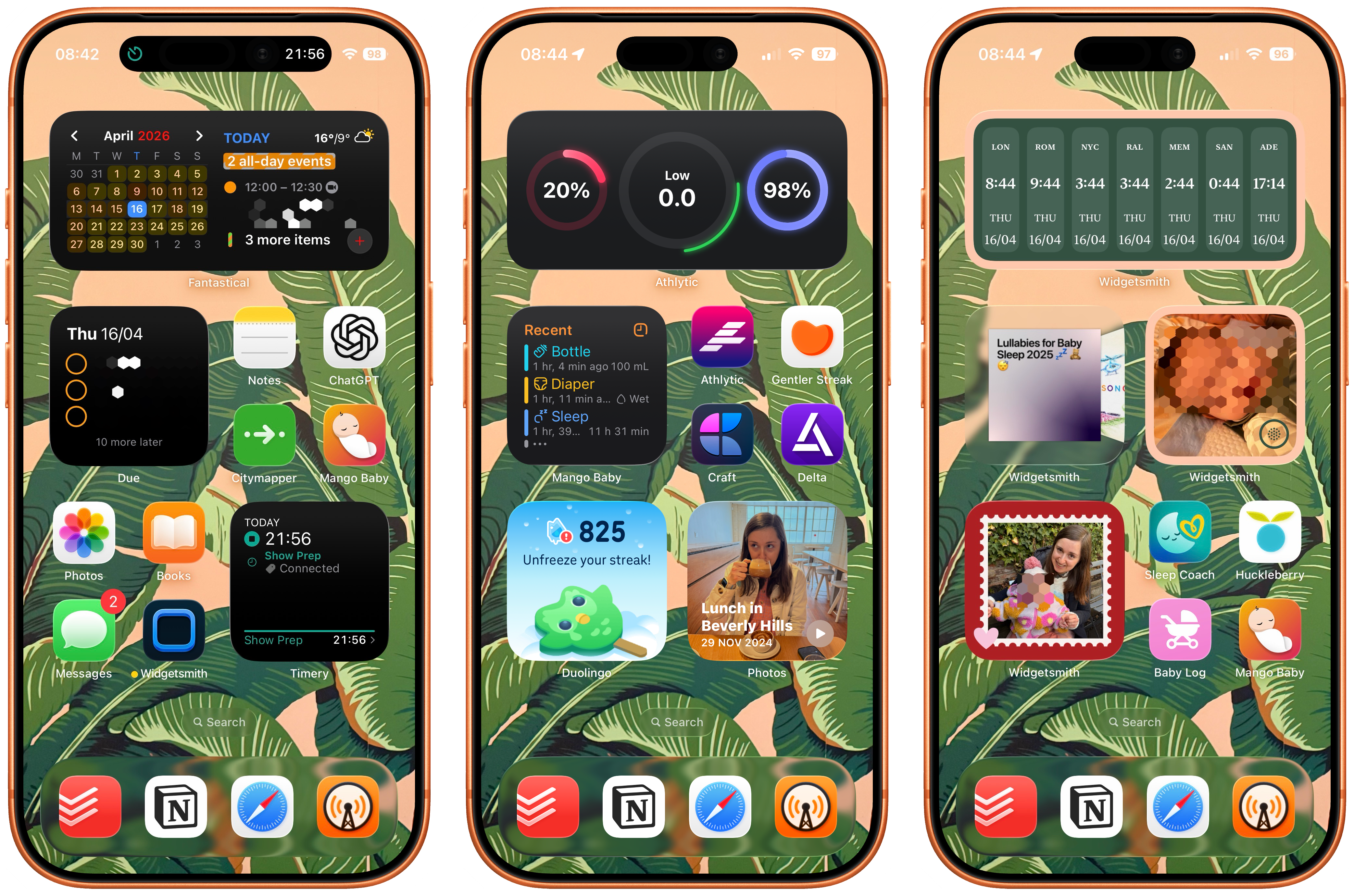
In um in honor of this, it's like what what's the best thing that we can do on a podcast to celebrate Apple Frames is to show off and talk about our home screens. So we're gonna do that. Of course. Uh you'll find a link in the show notes to our current home screen uh arrangements. Uh should we talk through mine first?'Cause you've done a lot of speaking. Thank you.
Um, so this is my my current home screen, um, with the correct iPhone. I like that by the way. Yeah, I think it's really cool that you do that. Um, so across the top I I I'm I'm very widget focused. I've always been very widget focused and now even more widget focused than I was before because part of my living is made by widgets now. Um the top kind of stack uh I I like stacks too on my main home screen. It's uh uh Fantastical.
Um, and carrot weather has always been the the classic uh kind of stack that I have there. I do also have a widget smith. uh s calendar there too, uh which I've been tinkering with and playing around with a little bit recently.'Cause I do actually really like the way it's i it uh operates in widgetsmith and you can use um
URL schemes that when I tap it, it opens Fantastical. So that actually works pretty well for me. Um but I'm I'm playing around with it. I I haven't been able to drop the Fantastic L widget yet. I'm not really sure why. I feel like it's just a part of my heart that I can't do it. Um, then I have another widget which is Due. So I use Due for lots of like kind of simple reminders, you know, like take out the trash, that kind of stuff. So if it's gonna happen every day.
And reminders that like I can't afford to miss because something bad will happen. Like I have like medication reminders some I will put in there, um, little things like that. Um, lots of little house chores. But that's a stack, and underneath that is Reminders, which has kind of like bigger shared family projects going reminders. So I've got those going on there.
Um and then I have like two groups for four apps. So starting from the top I have notes, because that's just my notes app. And I can't imagine moving. I really love the notes app. Uh I have ChatGPT next. I'm thinking of changing this to Claude. Like I I I've been I've been using Claude more and more. Um the thing that I haven't yet moved all over into Claude is just kind of like my general
instead of a web search searches. I I haven't really put kind of Claude through its paces for those, but I expect it probably does a good enough job. So that's kind of my next thing to do. But I'm using ChatGPT less and less and I'm using Clawed more and more. Um and yes, Claude has been a sponsor, but the reason is because Federico for my birthday gave me a a very nice gift of
uh Claude I don't remember Max. You gave me a month of Max. Then I went and built a bunch of apps and I was like, Oh, you know what? I love this. And I I'm a big fan of cowork. Claude cowork is really great. And c when you hook that up with its connectors, man, I've been doing some fantastic stuff recently with like being able to connect Claude to local files and my Notion database. Whoa baby, I've been doing some stuff. I'm having a great time.
Um and I've got City Mapper, which is the app that I use for getting around London. City Mappa is fantastic for r public transport. Absolutely. The best interface, it really understands what's going on, uh has really good like filtering and stuff. Like in the summer they have a has aircon button for the different transport options. It's very clever stuff. They they really understand city living and how travel works in cities.
Um, then I've got Mango Baby, which is the baby tracking app that I've used for a really long time now. Um, obviously for over a year, uh for obvious reasons. Then I have the Photos app, which you know you've got to have your photos. Then I have books. What about that? I'm reading Napoleon China but I'm reading reading it. You know, like I'm actually Reading, reading it. That w used to be Instagram there and I replaced the Instagram app with the Books app and uh I'm very happy. Um messages.
Got messages. Then I got Widget Smith, which is like it was really weird for me to do this, to like put Widget Smith on my main home screen because it's like I have so many ways to get to it, but we've got some stuff coming, which means that I'm needing to check the app more and more and more. And it became annoying to search. So it's like, all right, I'm putting Witchesmith on my home screen and I'm just dealing with it. Um I expect that there's maybe like
four to five people in the world that have widgetsmith just the app on their home screen and now I'm one of them. And the rest of them also probably work on widgetsmith would be my expectation. Um then I have timery um and underneath timery is a kind of a a a small kind of two-stack shortcuts widget, which is two of my most used time tracking focused shortcuts. Um so that I have one which is to um just go back in time and add uh an entry. So like I can say like press a button
it pops up and I like fifteen minutes, thirty minutes or enter a time. And this is like sometimes I found myself working on something and I'm like, oh, I forgot to start my timer. So I could just jump back in time and add an entry. And then the other one is uh for when I'm recording shows, it's a shortcut that looks at my calendar, finds the name of the current entry in my podcast calendar.
And then adds that name as a tag to a uh a time entry because I just format things in such a way that that all works very nicely. Um in my doc I have Jodoist Notion Safari and Overcast. Um then on my second screen I have a stack of health apps. So Athletic is my favorite. Um, but I also have been trying out a couple of other ones. I have Peak in there and also um uh
Gentler Streak, which I also have the icon for Gentler Streak on my home screen. Gentler Streak's not gonna last. It just doesn't work for me. I can't explain it. It just doesn't have the feeling that I want. Athletic is absolutely the app that I want. Um, I then have a Mango Baby Widget. I have craft. Um I've been playing around with craft for some note stuff, but again, I also don't think that's gonna last. Um
And then I put Delta on. Uh I was started replaying a Pokemon game a little while ago, but uh I've stopped now. But yeah. So that that kind of there's like a four stack there of of um Apps, those are like things I need that I'm trying. Right. It's like it's like a reminder to try the things that live in that space. Um I then have Duolingo. Uh I I missed my Duolingo yesterday, uh which I was very upset about. Uh but I guess I'm sorry for your loss.
It's okay. I I d I'm not too precious about this the streak. Um I've been doing Duolingo for over eight hundred days. At this point I'm not super upset about the streak thing. Uh basically I was doing my Duolingo um at night. So like we used to give Sophia like one like we'd kind of wake her up and give her a feed, like give her a bottle.
That stopped happening completely threw my life into disarray of like when I do my Duolingo, and now I just keep forgetting. Um, but it's fine. I For a sec for a second my brain thought give her an RSS feed. I'm like kid You need to learn about C L I's You're gonna get replaced. You gotta hurry up. Uh then I have a stack of photos widgets. So I've got the Photos app and then a bunch of like I have two widgetsmith widgets.
Uh one is an on this day widget, uh one is a um pulls from albums, and one pulls from favorites. Now say all of this sounds like wow Mike's talking about Widgetsmith a lot. B is it because he works there? Now on these two pages, all of the widgets that I had, I had before I started working with Widget Smith.
The next page, these are all that I did afterwards. Right. So like I've been using Widget Smith for a long time anyway. There's a lot of hist I there's a lot of hi documented history of my uh home screen, so you can prove that fact yourself. Uh then on my last page I have a bunch of other widgets. So I have a time zone widget, I have a music widget, which gives me quick access to a bunch of music that we play for Sophia. So we have like a lullabies playlist.
There's also uh Imogen Heap's Happy Song, which is just one of the greatest creations in all of history. Federico, it was a scientifically um it was a it was a song that was backed by scientific research from Goldsmith University. In the UK to create a song that would make children happy. They approached Imogen Heap. She said yes, they produced it. This song is like a thing.
child's unhappy, you play the happy song, they become happy again. Unbelievable. Uh then there is a white noise widget. It actually plays Do I have brown noise? Yeah, brown noise, which is just a nicer sound than white noise. Um and then just like a photo of uh Adina and and the baby. And there's there's also some other photos which is uh in that stack of some secret things that we're working on.
And then I have a collection of baby related apps. So uh Sleepcoach and Huckleberry are apps that we've done use for different things. Sleepcoach is like a sleep predictor app. Um Huckleberry is like Huckleberry is what Mango Baby is, but not made by an independent developer. What if like this app but they really want you to become s like all parents use Huckleberry?
It's the one that is, I think, a bit predatory. Like they really want your subscription and it's really expensive and that kind of thing. Um and then babylog is a shortcut that I made that just does a bunch of things. So yeah, that's my home screen.
¶ Sponsor: Steam Clock
This episode is brought to you by Steam Clock. A lot of mobile apps, they're just mediocre. They're not broken. They're just okay at best. But you and I know you as a listener of this show notice the difference when you use an app that is actually good. And Steam Clock Software builds mobile apps for companies that care about taste.
They are a design and development studio based in Vancouver, Canada, and they have been shipping iOS and Android apps for over 15 years. Their clients are growing tech companies that care about mobile, but don't have the in-house team to build something great.
SteamClock works with companies to level up their apps so they can go from it's holding us back to it's pulling its weight. Some of their clients discovered the hard way that vibe coding your way to the app store is not a viable product strategy. What makes Steam Clock worth calling out isn't just that they execute well, it's that they'll help you figure out the right approach and give you an honest read on your situation before committing to anything.
Their client apps have been downloaded over 10 million times and they've helped five of their clients through acquisitions. If you're building something and need a mobile team that cares just as much as you do, Steam Clock is where you start. Visit steamclock.com slash connected to get in touch. That is steamclock.com slash connected. A thanks to Steamclock for their support of this show and all of Relay.
¶ Federico's Home Screen Breakdown
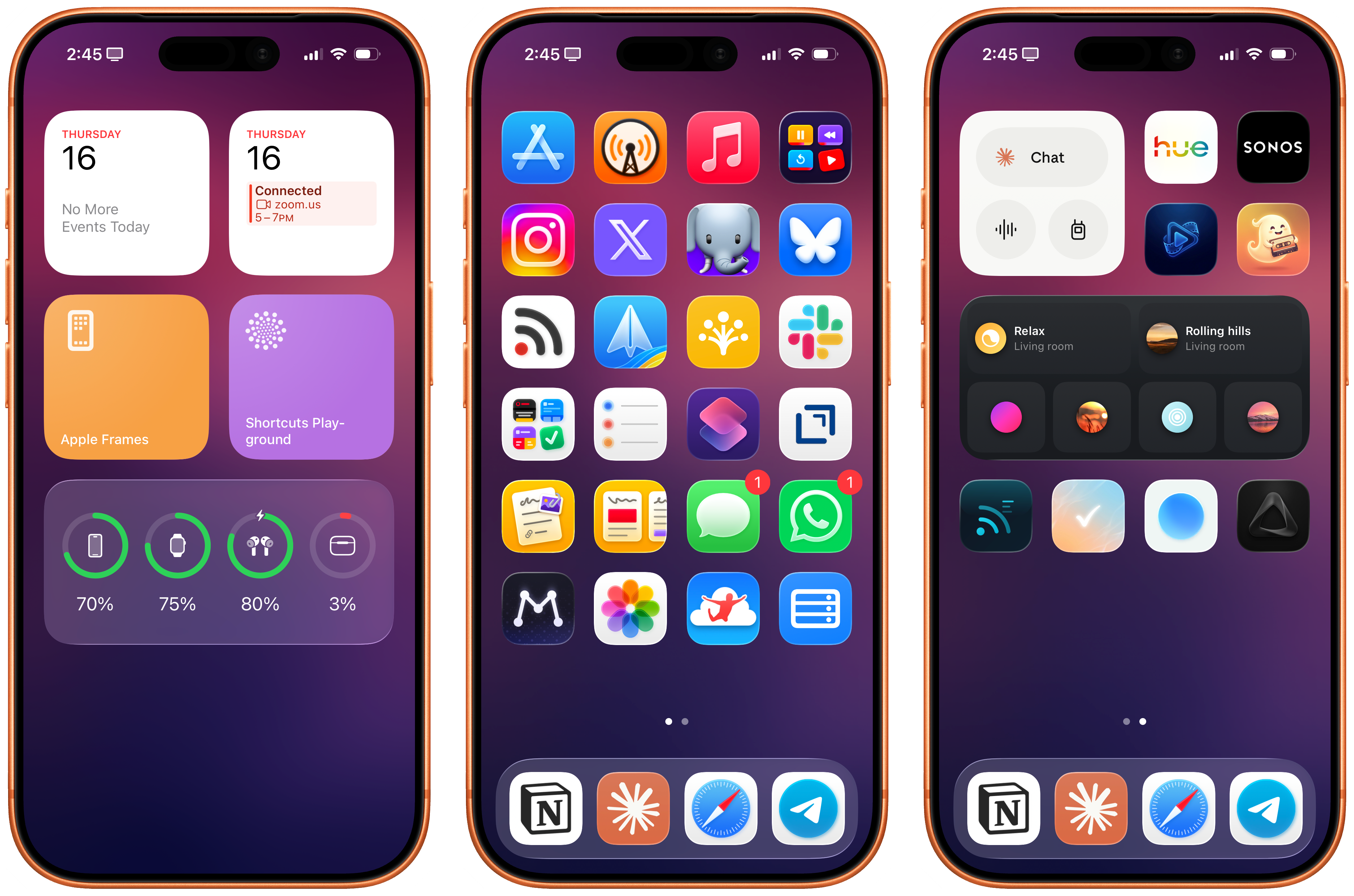
All right. Mine is a pretty simple home screen, I think. Okay. Um So I don't really use widgets. I use widgets much less than you do. So starting from the are you gonna upload this to the Discord, by the way, Mike? Thank you. I don't understand. I use the left page the today page of the home screen.
Um for basic stuff, like I have two calendar widgets, one for the family calendar, another for the work calendar. Then I have two shortcuts widgets, one for Apple Frames, one for shortcuts playground, which I use all the time to sort of generate shortcuts. on my Mac Studio server in the background and then install them directly on my iPhone and then the batteries widget. I very simple use. use that screen at all anymore.
Hm, interesting. That's uh I use it because I really don't wanna see widgets on my primary home screen, which is has to be all about icons. Okay. And maybe eventually uh uh I I really would love to have keyboard input support for widgets like it's possible on Android, but that's not possible on iOS, unfortunately. Uh on my home screen it's b these have been the apps that I've been using Most it's been pretty consistent. Um
The one thing I will the one thing I will call out immediately is that uh you will see the icon for X on my home screen. I am not a I I am not an X user, but unfortunately I have to use it to keep up with some AI news that Unbeknownst to me only happen there. Don't ask me why. Some people don't use blogs. Some people don't post on Blue Sky or Mastodon. They just I uh we mentioned this before on the show. I am so confused by the fact that a bunch of people who work at OpenAI, people that I know.
continue posting on X. A company run by the guy that is suing open. But it's self perpetuating, right? Like if they continue to do it. It's the place you have to do it. Like if you want to talk about AI, you have to go there. I don't know why that is the case. Like Yeah. Like I would understand, sure, if you don't want to use Mastodon for whatever reason. But is Blue Sky exists? Like why not use that?
I don't get it. I I don't understand it, but unfortunately I have to use it because like some I have m noticed things and and discovered people that became meaningful connections for Mac stories, for things like embargoes and articles, including one that you will see. In a few minutes... Well I'll put it in the show notes. Yeah. In about 15 minutes, you will see one that is a result of one of these connections from X, unfortunately. So.
It is what it is. I I was opening the timeline enough times during the day to realize, well, I'm just gonna swallow this ugly thing and put X on the home screen. Whatever. Anyway, so that's my social row of icons, uh Instagram, X, Mastodon, and Blue Sky. Top Row has always been about media for me. So uh App Store, because I check for app updates multiple times a day. Uh I recently switched from pocket casts after many years back to overcasts. Yeah. Because of the transcript.
uh feature and because um I don't know there's something about it the story that Marco told on ATP about like uh going from one Mac mini to a fleet of Mac minis in a data center and using the Apple APIs for transcriptions and the plans
that he has for the future. There's something so cool about the fact that there's a a small army of Mac minis in a data center uh you uh generating transcripts or you can generate it uh on device using the Apple framework. I don't know. It's just a beautiful thing. Beautiful nerdy thing that makes me happy. Whenever I do use the transcript feature, which I do, it's quite handy.
to skip ads in podcasts. Yeah. Uh but also to um go back and and you know double check did that person really say that or, you know, just find something. So really cool. Uh and also the overcast audio effects are, I gotta say, still unparalleled compared to Pocket Cast or Castro. It's got the best audio boost and the best stream silence bar none. And I have tried them all. So
I finally, finally I can say this with confidence, finally switched for good from Spotify to Apple Music. I was able to to to stick with it this time and I'm really happy because I don't wanna use Spotify anymore. Uh it's I just very much, very, very much like the Apple Music UI, especially the now playing screen with lyrics.
It's just so much nicer than Spotify. And I love the ability to pin albums and artists or playlists to the top of your library, which is something that I do a lot for new albums I want to listen to.
¶ Federico's Custom Web Apps
The other icon is one of the many icons for vibe-coded apps by me. Uh but I commissioned these icons. So that icon next to Apple Music. Uh the the light mode uh equivalent uh in the third row from the bottom and then the two yellow ones. Uh those are all commissioned icons that I created for some of my local web apps that I commissioned to excellent icon designer Matthew Skiles. So Matthew did really, really excellent work with these apps. This one in particular.
is a YouTube watch leader uh web app that I created for myself. Uh those YouTube videos are actually saved in My Notion. So it's a web app that loads Uh YouTube videos that I see for later with the Notion web clipper. And I have a Notion AI agent that reformats them, presents them nicely, and gets them ready for this web app. Where they are presented in a grid view that shows me a timestamp, a duration, a summary, a bunch of nice things.
Third row from the top, we have unread, my RSS client of choice. Uh we recently stopped using Superhuman and we went back to Spark. Whoa, that's a big change. Because of Silvia, Sylvia could not stand superhuman and she forced me to bo go back to Spark in her own words, the only good email app that was ever made. To speak to Sylvia. Sylvia thinks this Uh well, I mean sh is she ever used mailbox? That's the only good email I've ever made.
Sylvia clearly didn't hear my diatribe of the reverse version of the Spark mail app um on the Mac, which was whoop. No. Probably better now, but uh It's it's kinda better now. Uh but yeah, so we're using Spark. It's fine, we got sharing. Uh there's no AI search, which is too bad, but whatever. Uh next up is a shortcut uh uh called the Notion Central. It's a it's a menu shortcut. It lets me open my daily notes or other pages in my Notion. Slack, which we use for team communication.
Then moving down, there's the other web app. Uh this is similar to the other one in that it's based on the same Notion database, but it's about a regular web clippings. So all the things that I clip in there except the YouTube video. So stuff I find on the web, that's my web clippings database. I know you use Notion a lot now and I've heard you talk about it, but do you not use Obsidian at all anymore? I've been riding in Notion for the past uh yeah. Yeah. You're completely Not at all. Obsidian?
Yeah, yeah, I am intrigued by this new trend of using Obsidian locally with cloud code. Uh but I don't know. Notion is just there's this new term that I use a lot to describe these AI experiences. Um it's ergonomic. And by that I mean and I and I think the same about uh Claude. I find that Notion and Claude are some of the most AI ergonomic AI products in the sense that they adapt to.
Yeah. That they are comfortable to use from many different devices, they have different input methods, they are very flexible, they are comfortable to use. And I find Notion very comfortable, especially the Notion AI product that they have. You can use it on the web. They're coming out with an iOS app just for Notion AI. It's very easy to use and fast and reliable. OK
¶ Federico's Productivity Apps and CLI
Reminders I have been using again as my primary task manager. For a couple of reasons. The first one is, again, when I say the cloud is ergonomic, I really like the fact that cloud on iOS has a built-in reminders integration. Oh, so you can just enable yeah, it it integrates with reminders and calendar. So if you go in settings on iOS and iPad OS, you flip a switch, you grant it access.
It can natively read and write to your reminders. So it's a way to use reminders with a good AI on iOS. Reminders also works with perplexity. If you're into that. Uh but the second reason, and a small teaser that I also posted on Mastodon a couple of weeks ago, my second CLI mic will be a reminders CLI. for AI agents on desktop. And I will tell you because the whole point of making this CLI was to make the best CLI for reminders.
Uh I researched my competitors in this field and I think I have the best CLI for Apple reminders uh that you can find on macOS. So that that'll be open sourced uh at some point in the near future. But yeah. shortcuts, draft, Uh I'm using drafts as a quick text scratch pad. It's pretty excellent for that. The next two are two other vibe coded web apps. The first one lets me quickly add text or images or audio to my Notion Daily note for the day.
Also a custom icon by Matthew. And next to it, a sort of similar notion daily note to web app, but to scroll horizontally, as you can see in the icon, my currently open daily note. So daily notes that I still have not marked as done, I can review in that web app. My message, WhatsApp, Matter, which I'm using as my read later again because of two features, the superior text to speech and the CLI, of course, that came out a couple of days ago.
Photos, jump desktop, and uh bottom right is a shortcut called launch menu. It's a menu launcher for all of the web apps that I'm running on my Mac Studio server, all the things that I built for Mac. And in the doc, Notion, Claude, Safari, best browser that you can use on iOS, and Telegram, which I exclusively use for Cloud. Okay.
¶ Federico's Testing Page & Learnings
Finally, on the last page, it's sort of like my random page where I test stuff. There's the cloud widget, which uh currently gained the ability to be customizable. So you can change the buttons in the cloud widget. uh you sonos two vibe coded web apps uh one for watching videos that I bookmarked on X This is another thing that people do on X. Content creators posting long form videos on X instead of YouTube and forcing me to watch them on X.
No thank you. So I vibe coded a web app that takes my bookmarks from X, downloads those videos, and lets me watch them in a native Apple video player. So I don't have to use X for video consumption too. Next to it is a little uh this this this is AI generated. I still have not commissioned these icons called Ghost Reader. Yeah. It's kinda cute. Has it got a cassette though?
Yeah, because it's uh it's um it's um it's a way for me this is before I switch to matter. Okay. Um uh it's based on ReadWise Reader. Yeah and it lets me listen to audio summaries of articles from my ReadWise Reader. Okay. Probably gonna get rid of it, so I will not commission the icon. Um the Philips U widget. And the last row is two dictation apps and two vibe coded web apps. The two dictation apps that I need to make a decision about right now are Aqua Voice, the one with the blue circle.
and Super Whisper. Both offer an iOS keyboard. I think I'm leaning toward Aqua Voice. Super Whisper is kinda weird and complicated on the Mac. I think Aqua Voice is a little more Apple like and intuitive and they have their own custom voice transcription model that I think works better than Super Whisper, so are probably gonna stick with Aqua Voice.
And next to it, uh the first one, the RSS icon, I think this one I will commission because this is the RSS reader that I'm Especially on the iPad and the Mac, I've been using more than on Red. I built for myself a Kanban board RSS reader where articles are not grouped by folder. They're not grouped by website. They're grouped by topic. Thanks to AI. So whenever I open it, the AI takes a look at my unread articles and groups them in columns by topic.
It's a very nice way to mark a bunch of related things as red and to find them all grouped in the same section, thanks to natural language processing. And finally, the check mark is another local web app based on my reminders CLI. Okay. It's a web app that provides a custom uh calendar view for reminders.
Um, it was a quick experiment. I'm not sure what I'm gonna do with it, but like all my other experiments, it was a learning opportunity. I learned about a bunch of web frameworks I was not familiar with. I don't know what I'm gonna do with it.
Uh a lot of the things that I try and build I eventually discard. Uh because the other the only reason I do it is uh like the things that I the things that I release to the public are like a fraction of the things that I build. Yeah. Uh and most of them get discarded, but Every time I learn something and that I think is really valuable, especially if, you know. I'm gonna be forty in in two years and I and I wanna keep my mind fresh and active and curious.
And uh and I and I think that tinkering with AI and these things is a great way to to stay on top of things. Even if I don't end up releasing a bunch of a bunch of these things, it j i it it was always a learning opportunity. So That's it. And the empty row is empty is empty because that's where I drop random stuff that I want to test from the app store uh when I'm when I'm writing for MacStories Weekly, the app debuts, that kind of thing.
¶ Episode Wrap-up
All right, if you wanna get the notes for this episode, they should be in your podcast player of choice, but they're always on the rep the web over at relay.fm slash connected slash five nine nine. is the name of this episode. If you'd like to leave us some feedback or you got any follow-up, go to connectedfeedback.com and you can do that. And if you would like a longer, ad-free version of this show every week, go to getconnectedpro.co and you can sign up.
This time we spoke about Federico's uh reemergence to Tears of the Kingdom. So if you want to hear more about that, you can. If you would like to catch up with the Prince Flexi online, he's the editor in chief of maxstories.net. Uh you can also find Federico on a variety of podcasts like App Stories and NPC. Uh you can find me uh here on Relay. You can check out my work at Cortex Brand and The Enthusiast.net.
And if you would like to uh l find our missing AG Flexi, this Stephen Hackett, you can go to five twelvepixels.net and find him there as well. I would like to thank our sponsors for this week, that is Mercury Weather, Squarespace, and Steam Clock. But most of all, thank you for listening. Until next time, say goodbye, Federico. arrivederci